Quick answer: To remove hacked spam URLs from Google, first clean the malware that generated them. Next, collect samples of the unwanted URLs, identify repeatable path and query-string patterns, make those URLs return a real 404 or 410 response, temporarily suppress urgent patterns through Google Search Console, and submit a fresh sitemap containing only legitimate pages.
This is the process I used after a hacked WordPress website accumulated approximately 242,000 unwanted Japanese SEO spam URL variations.
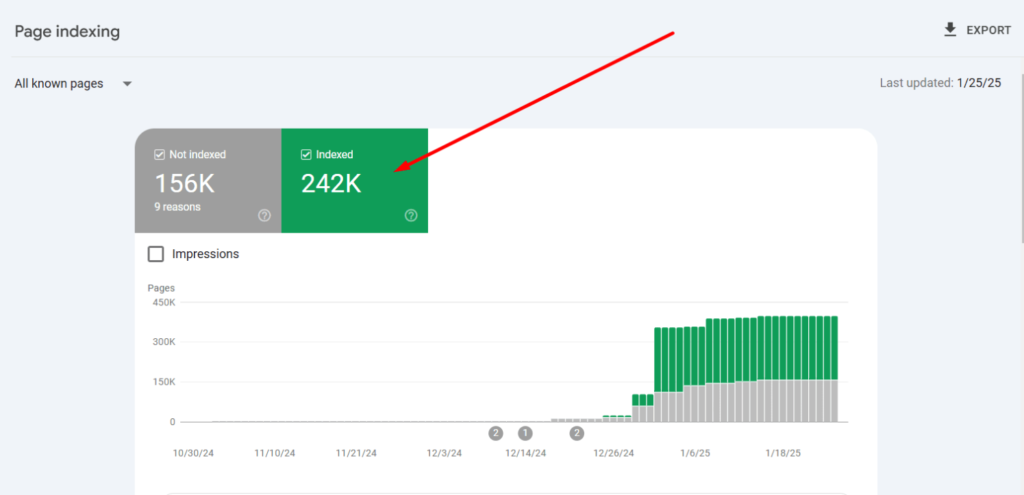
The website appeared normal to its owner. However, Google was showing Japanese product titles, unrelated shopping pages, random numerical URLs and content that did not belong to the website.
This was not simply a malware-cleaning job. It required two separate recoveries:
- WordPress malware removal: Stop the site from generating more spam.
- Google index cleanup: Remove the hacked URLs that Google had already discovered.
In this case study, I will explain how I:
- found and removed the underlying WordPress malware;
- collected hacked URLs from Google Search Console and search results;
- identified patterns such as
?p=,?q=and?a=; - built a case-specific
.htaccessfirewall; - returned 410 Gone before WordPress loaded;
- used Search Console temporary removals and prefix removals;
- submitted a clean replacement sitemap;
- tested a separate spam URL sitemap during the recovery;
- reduced unnecessary PHP and database processing;
- monitored Google until the spam footprint disappeared.
What the Japanese SEO spam looked like in Google
One of the clearest signs of the compromise was a Google search for the affected domain.
Instead of showing the website’s real pages, Google displayed Japanese product listings, prices, reviews and descriptions that had never been created by the owner.
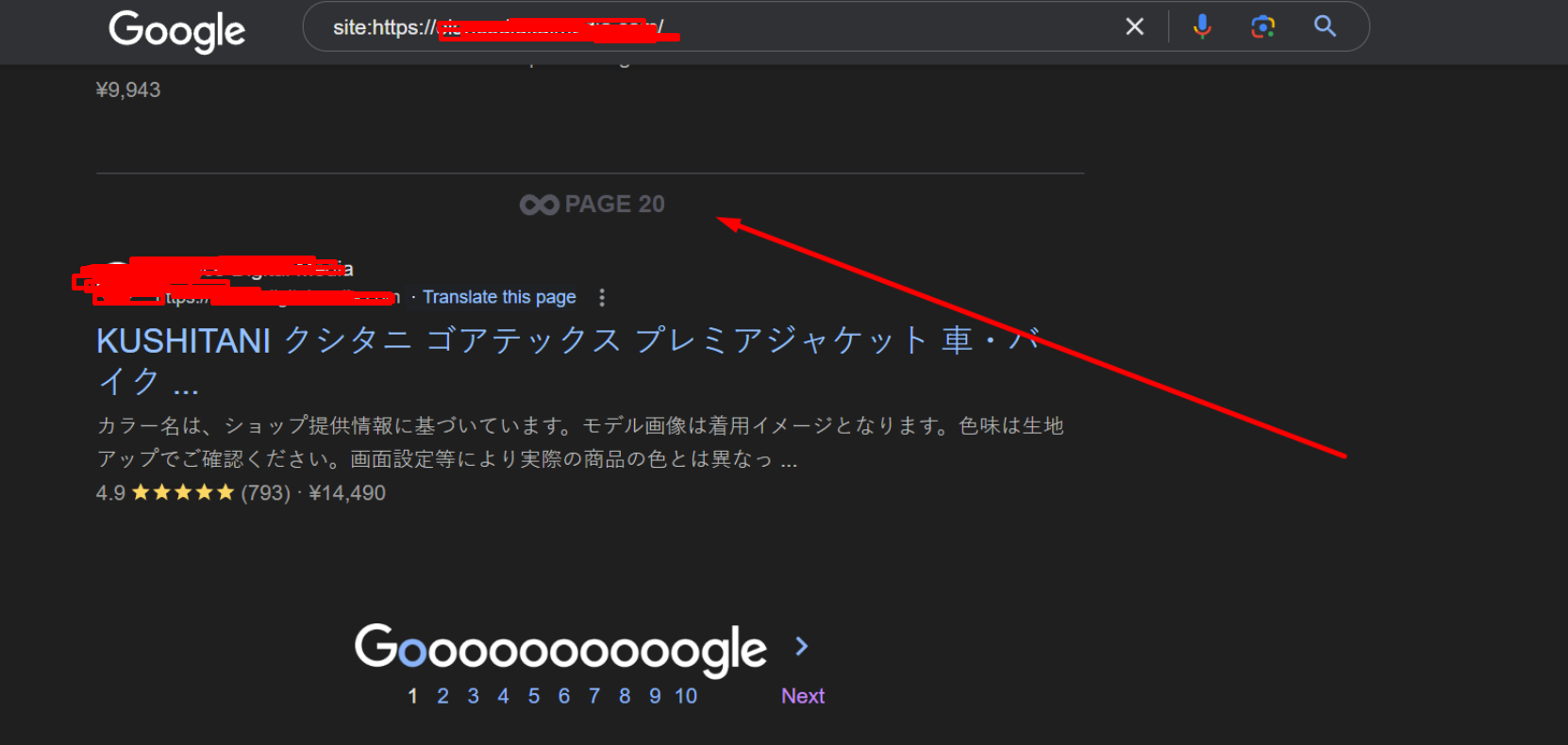
The site search continued through many result pages. This indicated that Google had discovered far more than one or two injected posts.
Why is content that is not mine showing in Google?
When Google shows text, products or pages that you did not publish, the website may have been compromised by an SEO spam campaign.
The attacker may create or simulate URLs containing:
- fake product information;
- Japanese shopping keywords;
- pharmaceutical spam;
- gambling-related terms;
- adult spam terms;
- random directory names;
- large numerical query parameters;
- generated
.htmlfilenames; - cloaked content visible mainly to search engines.
In some infections, the spam exists as real files or WordPress posts. In others, malicious PHP or rewrite rules generate a response dynamically whenever a particular URL is requested.
This means the owner may not find 242,000 posts in the WordPress dashboard even though Google has discovered thousands of URL variations.
Why are unwanted product pages showing under my website?
Japanese keyword hacks commonly use compromised websites to promote fake or unrelated products.
The malware may generate titles, descriptions and structured product data while showing the website owner a normal page or a fake 404 response.
Examples may look like:
https://example.com/random-folder/product-name.html
https://example.com/jp/fake-product/
https://example.com/products/23932
https://example.com/?p=23932
https://example.com/?q=98237492
https://example.com/?a=739284729
These URLs may be discovered through malicious sitemaps, injected links, hacked Search Console ownership, external spam links or normal crawling of infected routes.
Phase 1: Stop the WordPress SEO spam infection
URL removal should not begin until the malware has been contained. Otherwise, the website may continue generating new URLs while older ones are being removed.
Create a forensic backup
I first created a backup of the infected files and database.
The backup was not intended to be restored as a clean version. It preserved evidence that could help identify:
- when files were modified;
- which accounts were added;
- how the malware persisted;
- which directories were targeted;
- whether the infection returned after cleanup.
Compare WordPress core files
I compared the installation against a clean copy of the same WordPress version, paying particular attention to:
index.php;wp-blog-header.php;wp-settings.php;wp-config.php;- root and nested
.htaccessfiles; wp-adminandwp-includes;- unexpected PHP files inside core directories.
Attackers often modify legitimate filenames, so searching only for unusual filenames is not enough.
Review plugins, themes and must-use plugins
I inspected active and inactive plugins, themes, drop-ins and the wp-content/mu-plugins directory.
I looked for:
- plugins the owner did not recognize;
- files without normal plugin headers;
- recently modified PHP files;
- obfuscated or encoded PHP;
- remote code-download functions;
- malicious WordPress cron events;
- PHP files hidden inside uploads;
- code that changed output based on the visitor or user agent.
For a broader explanation of this process, see my WordPress malware removal service.
Search the WordPress database
SEO spam is not always stored in the filesystem. I also searched the database for injected scripts, unknown options, hidden links, spam titles and unauthorized users.
The investigation included:
wp_postsandwp_postmeta;wp_options;wp_usersandwp_usermeta;- widget content;
- page-builder HTML blocks;
- SEO plugin metadata;
- scheduled WordPress tasks.
See my WordPress database malware guide for the main database locations I inspect.
Audit WordPress and Search Console users
I removed unauthorized WordPress administrators and checked whether an unknown owner had been added to Google Search Console.
I then rotated the relevant credentials:
- WordPress administrator passwords;
- hosting control-panel credentials;
- FTP and SFTP accounts;
- database credentials where necessary;
- administrator email passwords;
- DNS and CDN access.
I also regenerated WordPress salts and enabled two-factor authentication for administrative accounts.
Phase 2: Find the unwanted URLs Google discovered
After cleaning the infection, I collected enough URL samples to understand how the spam system worked.
The goal was not to review 242,000 URLs individually. The goal was to discover the small number of patterns producing those URLs.
Check Google Search results
I began with searches such as:
site:example.com
site:example.com inurl:jp
site:example.com inurl:products
site:example.com filetype:html
site:example.com "Japanese spam term"
A site: search does not provide an exact count of everything in Google’s index, but it is useful for finding visible examples of unwanted content.
Check the Search Console Pages report
In Google Search Console, I reviewed:
Indexing → Pages
The report helped reveal examples of:
- indexed hacked URLs;
- crawled but currently unindexed spam;
- 404 and soft-404 pages;
- duplicate generated URLs;
- URLs submitted through malicious sitemaps.
Export page and query data through the Search Analytics API
The Search Analytics API was useful for finding hacked pages that had received impressions or appeared for unrelated queries.
I opened the official API Explorer:
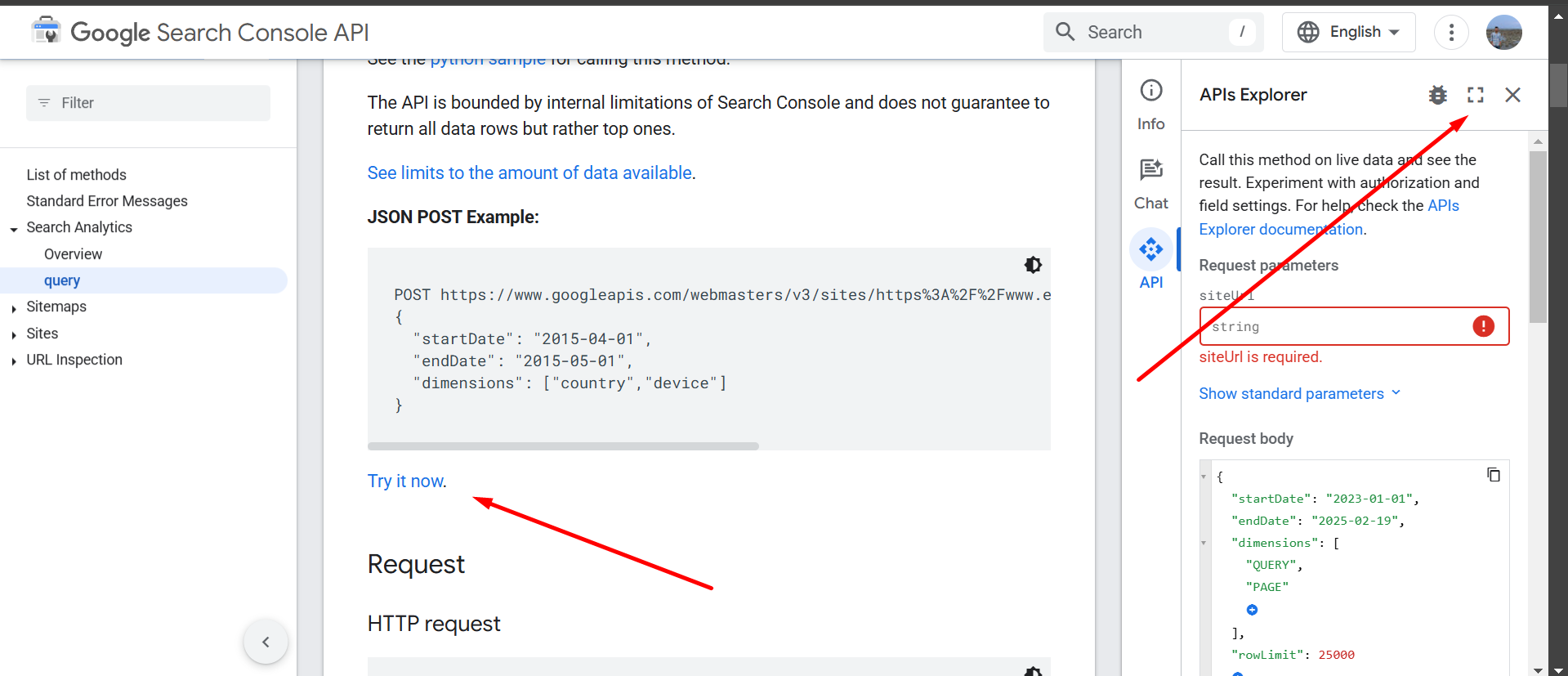
I used both the query and page dimensions:
{
  "startDate": "2023-01-01",
  "endDate": "2025-02-19",
  "dimensions": ["query", "page"],
  "rowLimit": 25000,
  "startRow": 0
}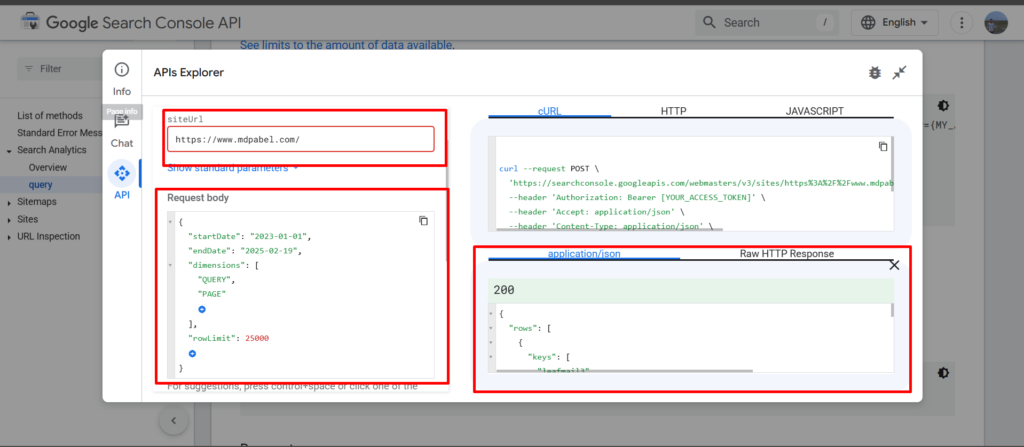
The API allows up to 25,000 rows in one request. Additional batches can be requested by increasing startRow:
{
  "startDate": "2023-01-01",
  "endDate": "2025-02-19",
  "dimensions": ["query", "page"],
  "rowLimit": 25000,
  "startRow": 25000
}
Later batches can begin at 50000, 75000 and so on.
However, this data represents Search Console performance rows. It should not be treated as a guaranteed list of every indexed URL.
Review server access logs
Server logs revealed URLs that bots were still requesting even when they no longer appeared prominently in Search Console.
I searched for:
- Googlebot requests to hacked paths;
- repeated numerical query strings;
- unknown
.htmlfiles; - requests reaching
index.phpunnecessarily; - new URL patterns created after the initial cleanup;
- high-volume bot traffic consuming server resources.
Phase 3: Analyze the URL patterns
I combined the exported URL samples into a CSV file and separated legitimate URLs from likely spam.
Basic domain filtering with Python
import pandas as pd

csv_file = "urls.csv"

df = pd.read_csv(csv_file)

site_url = "https://example.com"

filtered_urls = df[
    df["URL"].astype(str).str.startswith(site_url)
]

filtered_urls.to_csv("filtered_urls.csv", index=False)

print("Filtered URLs saved successfully!")
Filter suspected spam patterns
import pandas as pd
import re

INPUT_FILE = "urls.csv"
OUTPUT_FILE = "suspected-spam-urls.csv"
SITE_DOMAIN = "example.com"

df = pd.read_csv(INPUT_FILE)

if "URL" not in df.columns:
    raise ValueError("The CSV must contain a column named URL.")

urls = df["URL"].fillna("").astype(str)

domain_mask = urls.str.contains(
    rf"^https?://(?:www\.)?{re.escape(SITE_DOMAIN)}/",
    case=False,
    regex=True
)

spam_pattern = (
    r"/(?:pages|jp|products)/"
    r"|\.html(?:\?|$)"
    r"|[?&](?:a|q)=[0-9]{5,}(?:&|$)"
    r"|casino|gambling|viagra|cialis|poker|baccarat|roulette|jackpot"
)

spam_mask = urls.str.contains(
    spam_pattern,
    case=False,
    regex=True
)

suspected_spam = df[domain_mask & spam_mask].copy()
suspected_spam.to_csv(OUTPUT_FILE, index=False)

print(
    f"Saved {len(suspected_spam)} suspected spam URLs "
    f"to {OUTPUT_FILE}"
)
The paths, parameters and words in this example came from this particular incident. They are not universal malware signatures.
Patterns found during the investigation
Random single-letter query parameters
Some spam URLs used a letter followed by a large numerical value:
https://example.com/?a=839472938472
https://example.com/?q=739284729384
https://example.com/?x=193847293847
WordPress-style post parameters
Other unwanted URLs used WordPress’s normal post-query format:
https://example.com/?p=23981
https://example.com/?p=23932
https://example.com/?p=23919
https://example.com/?p=23783
Important: The ?p= format is legitimate WordPress functionality. It must not be blocked globally without first confirming that the affected IDs do not belong to real posts.
In this case, I compared the suspicious numerical range with the database’s legitimate post IDs before creating a rule.
Generated directories
https://example.com/pages/fake-product.html
https://example.com/jp/random-category/
https://example.com/products/23860
Spam keywords inside the path
Some paths included commercial spam terms directly in the URL.
Because the legitimate website did not publish content in those categories, the patterns could be blocked without interfering with real pages.
Generated HTML URLs
Many URLs ended with .html, even though the legitimate WordPress site did not use static HTML URLs.
A global .html rule is only safe when the legitimate site has no real HTML files or routes.
Phase 4: Return 410 Gone for confirmed hacked patterns
After identifying the repeatable patterns, I created a server-level firewall in .htaccess.
The rules were placed before the normal WordPress rewrite block so Apache could stop known spam requests before WordPress, the theme, plugins and database were loaded.
This had two purposes:
- Return a clear removal status to Googlebot.
- Reduce the application resources consumed by repeated spam URL requests.
Case-specific Apache 410 firewall
Do not copy this unchanged. Back up the original .htaccess file and replace the example patterns with patterns verified on the affected website.
# ----------------------------------------------------------------------
# CASE-SPECIFIC WORDPRESS SEO SPAM FIREWALL
# Place above the normal WordPress rewrite block.
# ----------------------------------------------------------------------

# Return a lightweight response without loading the WordPress theme.
ErrorDocument 410 "<!doctype html><title>410 Gone</title><h1>410 Gone</h1><p>This hacked spam URL has been permanently removed.</p>"

<IfModule mod_rewrite.c>
RewriteEngine On

# ----------------------------------------------------------------------
# 1. CONFIRMED RANDOM QUERY PARAMETERS
# ----------------------------------------------------------------------

# Examples:
# ?a=12345678
# ?q=987654321
#
# Add other letters only after confirming they are not legitimate.
RewriteCond %{QUERY_STRING} (^|&)(?:a|q)=[0-9]{5,}(&|$) [NC]
RewriteRule ^ - [G,L]

# ----------------------------------------------------------------------
# 2. CONFIRMED WORDPRESS ?p= SPAM RANGE
# ----------------------------------------------------------------------

# WARNING:
# ?p= is a legitimate WordPress parameter.
# Enable a range only after verifying that it contains no real post IDs.
#
# This example matches 23000 through 24999:
RewriteCond %{QUERY_STRING} (^|&)p=2[3-4][0-9]{3}(&|$) [NC]
RewriteRule ^ - [G,L]

# ----------------------------------------------------------------------
# 3. CONFIRMED SPAM DIRECTORIES
# ----------------------------------------------------------------------

RewriteRule ^(?:pages|jp)(?:/|$) - [G,L,NC]
RewriteRule ^products/[0-9]+(?:/|$) - [G,L,NC]

# ----------------------------------------------------------------------
# 4. CONFIRMED SPAM WORDS IN URL PATHS
# ----------------------------------------------------------------------

RewriteRule ^.*(?:casino|gambling|viagra|cialis|poker|baccarat|roulette|jackpot|porn|dating).*$ - [G,L,NC]

# ----------------------------------------------------------------------
# 5. OPTIONAL .HTML RULE
# ----------------------------------------------------------------------

# Enable only when the legitimate website has no real .html URLs.
# RewriteRule ^.*\.html$ - [G,L,NC]

</IfModule>

# ----------------------------------------------------------------------
# END CASE-SPECIFIC SPAM FIREWALL
# ----------------------------------------------------------------------
The Apache G flag returns a real HTTP 410 Gone response and stops further rewrite processing.
Why I did not block every letter parameter
A rule such as this would be dangerously broad:
[a-z]=[0-9]+Legitimate plugins, searches, advertisements, filters and analytics integrations may use query parameters.
I therefore restricted the rule to parameters and numerical structures confirmed during the investigation.
Why blocking every ?p= URL would be dangerous
WordPress commonly uses URLs such as:
https://example.com/?p=123These can point to legitimate posts and normally redirect to the post’s permalink.
Before blocking a numerical range, check whether those post IDs exist:
SELECT ID, post_title, post_status
FROM wp_posts
WHERE ID BETWEEN 23000 AND 24999
ORDER BY ID ASC;
If real posts exist in the range, use more precise rules or handle the spam URLs through custom application logic rather than a broad rewrite condition.
Test the 410 status
I tested known spam URLs using curl:
curl -I "https://example.com/?a=123456789"
curl -I "https://example.com/?q=987654321"
curl -I "https://example.com/?p=23932"
curl -I "https://example.com/pages/fake-product.html"
curl -I "https://example.com/jp/fake-category/"
The expected response was:
HTTP/2 410I then tested legitimate URLs:
curl -I "https://example.com/"
curl -I "https://example.com/wp-login.php"
curl -I "https://example.com/wp-admin/"
curl -I "https://example.com/?s=wordpress"
curl -I "https://example.com/?p=123"
These needed to continue returning their normal responses.
How the 410 firewall reduced server-resource usage
Without the early firewall, every request could reach WordPress’s front controller.
That may involve:
- starting PHP;
- loading WordPress core;
- loading active plugins;
- connecting to the database;
- running queries;
- loading the theme;
- generating a full 404 page.
By returning 410 at the Apache rewrite layer, known spam requests were stopped before most of that application work occurred.
This was useful because bots continued requesting hacked URLs after the malware had been removed.
On a high-traffic server, equivalent rules in the Apache virtual-host configuration, Nginx configuration, CDN or web application firewall may be more efficient than maintaining a very large .htaccess file.
410 vs 404 for hacked spam URLs
Both 404 Not Found and 410 Gone can remove deleted URLs from Google after they are recrawled.
I selected 410 for these patterns because the URLs were confirmed malicious resources that had been intentionally and permanently retired.
Benefits of 410 in this case
- It communicates that the URL is deliberately gone.
- It clearly separates confirmed spam from accidental missing pages.
- It can be returned directly through Apache pattern rules.
- It prevents WordPress from generating a soft-404 page.
- It makes confirmed spam requests easier to identify in logs.
What 410 does not guarantee
- It does not guarantee immediate removal from Google.
- It does not replace malware cleanup.
- It does not stop discovery of new patterns.
- It does not provide a guaranteed ranking advantage over a correct 404.
- It must remain consistent when Google recrawls the URL.
See my detailed guide to 404 vs 410 responses for additional examples.
Phase 5: Temporarily remove urgent URLs in Google Search Console
Once the server returned the correct status, I used Google Search Console to suppress the most visible hacked URLs while Google processed the permanent changes.
I opened:
Google Search Console → Removals → New Request
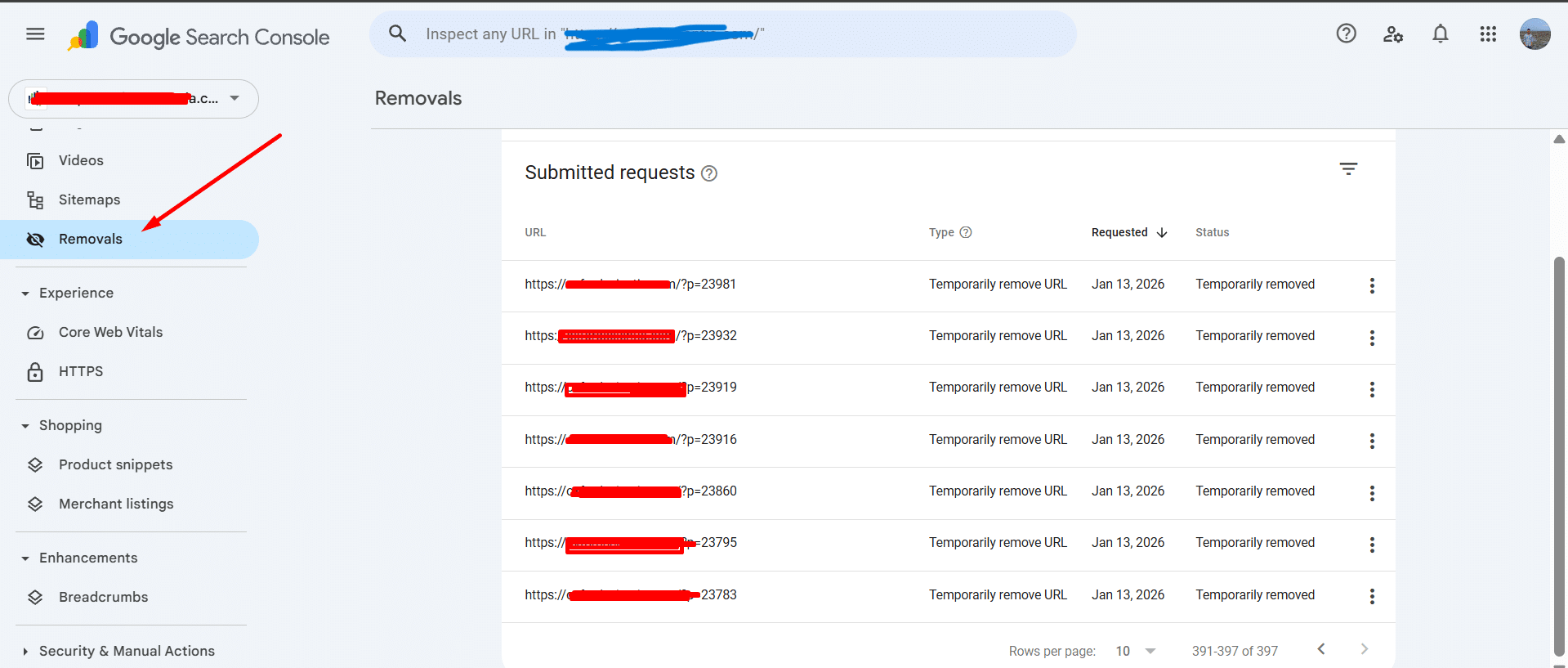
The screenshot shows hundreds of temporary removal requests for URLs using patterns such as:
/?p=23981
/?p=23932
/?p=23919
/?p=23916
/?p=23860
/?p=23795
/?p=23783
When to remove one URL
I used a specific URL request when the spam had no safe shared prefix or when only a small number of pages needed urgent suppression.
When to use “Remove all URLs with this prefix”
Prefix removal was more efficient for dedicated hacked directories such as:
https://example.com/pages/
https://example.com/jp/
https://example.com/products/
A prefix request should only be used when every URL under that prefix is unwanted.
It should not be used for a legitimate directory containing a mixture of real and hacked content.
Prefix removal is not regular-expression matching
The Search Console interface cannot accept an arbitrary regex such as:
[?&](a|q|p)=[0-9]+It matches the beginning of a URL. This is why server-level query-string rules remained necessary for dynamically generated variations.
Search Console removal is temporary
The Removals tool hides matching URLs from Google Search temporarily. It does not remove the malware, delete the underlying content or permanently prevent the URLs from returning.
The permanent signals in this case were the clean website and consistent 410 responses.
Phase 6: Submit a fresh sitemap containing legitimate pages
After the malware cleanup, I regenerated the site’s normal XML sitemap.
The clean sitemap contained only:
- legitimate canonical URLs;
- pages returning HTTP 200;
- content intended to appear in Google;
- the preferred HTTPS and hostname versions.
It excluded:
- spam URLs;
- 404 and 410 URLs;
- redirected URLs;
- internal search-result pages;
- duplicate query-string variations;
- malicious directories;
- hacked product pages.
I submitted the fresh sitemap through:
Google Search Console → Sitemaps
A case-specific experiment: submitting a separate spam URL sitemap
During this recovery, I also tested a separate sitemap containing known spam URLs after those URLs had been configured to return 410 Gone.
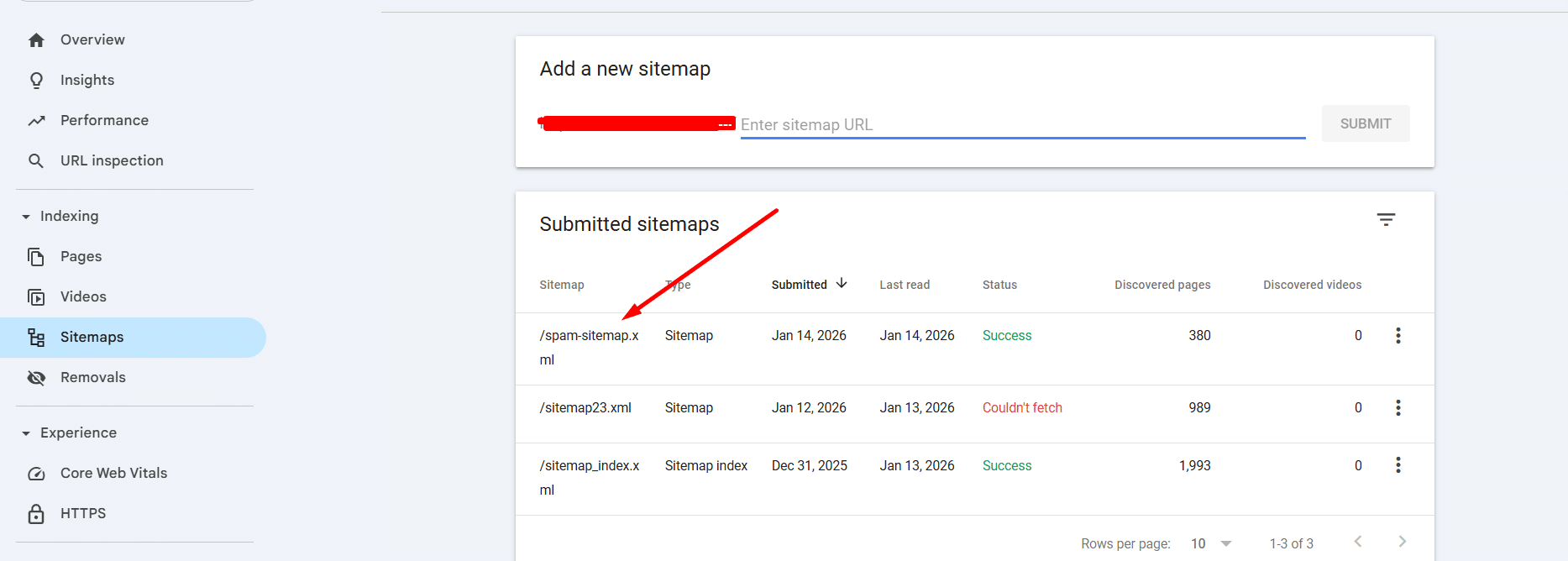
The purpose was to place a controlled batch of known URLs in one location so I could monitor whether Google revisited them.
However, this should be understood as a case-specific experiment, not the standard sitemap recommendation.
Google’s current sitemap guidance says a sitemap should contain the canonical URLs you prefer to appear in search results. It also states that including URLs you do not want in Search can waste crawling resources.
Therefore, my current preferred approach is:
- Keep the main sitemap completely clean.
- Return 404 or 410 for unwanted URLs.
- Use prefix removals for urgent, clearly separated patterns.
- Allow Google to recrawl the affected URLs.
- Monitor Search Console and server logs.
A temporary spam sitemap does not guarantee faster removal. When used during an investigation, it should remain separate from the canonical sitemap and should be removed after its purpose has been completed.
Do not block the hacked URLs in robots.txt too early
Google must be able to request an affected URL to observe its 404 or 410 response.
If the URL is immediately blocked in robots.txt, Googlebot may be unable to confirm that the resource is gone.
In this case:
- the spam URLs were excluded from the clean sitemap;
- the server returned 410 when they were requested;
- they were not hidden behind a broad robots.txt block.
Phase 7: Monitor the removal process
The technical cleanup took far less time than the search-index cleanup. Google still needed to recrawl and process the affected URLs.
Monitor the Pages report
I checked for changes in:
- indexed spam pages;
- not-found pages;
- crawled but unindexed URLs;
- duplicate URL variations;
- new spam directories;
- legitimate pages returning to normal indexing.
After a hacked-site cleanup, an increase in reported 404 or 410 URLs is not automatically a new problem. It may confirm that Google is reaching the removed spam URLs and observing the correct response.
Monitor search queries and pages
I watched for:
- declining Japanese spam impressions;
- disappearance of unwanted product titles;
- legitimate brand queries returning;
- correct titles and descriptions reappearing;
- new hacked queries suggesting reinfection.
Monitor access logs
The logs helped confirm:
- which spam URLs Googlebot revisited;
- whether those URLs consistently returned 410;
- whether requests still reached PHP or WordPress;
- whether new parameters were being generated;
- whether any legitimate page had been blocked accidentally.
Check Security Issues and Manual Actions
I also checked the Search Console Security Issues and Manual Actions reports.
If Google reports hacked content, the website should be fully cleaned before requesting a review. The review should explain what was compromised, what was removed and what was changed to prevent recurrence.
What did not work by itself
Deleting a few visible files
This did not address database malware, hidden backdoors, malicious scheduled tasks or URLs that Google already knew about.
Running only a security-plugin scan
Automated scanners were useful, but they did not replace manual file comparison, database inspection, account auditing and log analysis.
Removing URLs one by one
Processing hundreds of thousands of URLs individually was not practical. Identifying common patterns made the cleanup scalable.
Using only Search Console removals
Temporary removal requests could expire while the underlying URLs still returned content or HTTP 200.
Redirecting every spam URL to the homepage
The fake pages had no legitimate replacement. Redirecting unrelated hacked URLs to the homepage could mislead users and create soft-404 behaviour.
Blocking everything in robots.txt
This could prevent Google from recrawling the spam URLs and observing their removal status.
Using an overly broad .htaccess rule
A rule blocking every query string, every numerical URL or every ?p= request could break legitimate WordPress functionality.
Results of the cleanup
The final recovery included:
- removal of the active WordPress malware;
- removal of backdoors and unauthorized access;
- database and scheduled-task inspection;
- collection of hacked URL samples;
- classification of path and query-string patterns;
- deployment of server-level 410 responses;
- temporary Search Console suppression;
- prefix removals for dedicated spam directories;
- submission of a clean canonical sitemap;
- continued monitoring until the unwanted search footprint declined.
Approximately 242,000 unwanted URL variations were associated with the incident.
The malware cleanup and initial removal controls were implemented in under 10 hours. The Google deindexing process continued afterward as Googlebot revisited and processed the affected URLs.
Frequently asked questions
Why is Google showing pages that are not on my website?
Your website may have been compromised by SEO spam. Malicious code can dynamically generate pages, titles and descriptions even when those pages do not appear in the WordPress dashboard.
Why is unwanted Japanese text showing in my Google results?
This is a common symptom of the Japanese keyword hack. Attackers use compromised websites to generate Japanese shopping or product pages and manipulate search visibility.
Why are fake product pages indexed under my domain?
The infection may have created physical pages, injected database content, added malicious sitemaps or generated fake pages dynamically through PHP and rewrite rules.
How do I remove spam URLs from Google?
Clean the malware, make the unwanted URLs return 404 or 410, remove them from the canonical sitemap, use Search Console removals when urgent, and allow Google to recrawl them.
How do I remove spam URLs through Google Search Console?
Use a specific temporary removal request for individual URLs. Use “Remove all URLs with this prefix” only when an entire directory or prefix is malicious.
Are Search Console removal requests permanent?
No. They temporarily hide URLs from Google Search. Permanent removal requires an additional server or page-level signal, such as a consistent 404, 410 or valid noindex implementation.
Can Search Console remove all ?p= spam URLs at once?
The Removals interface is prefix based and is not a general regular-expression tool. Query-string patterns are usually better handled through carefully tested server or application rules.
Can I block every ?p= URL in .htaccess?
No. ?p= is a legitimate WordPress post format. Block only ranges or values confirmed not to represent real posts.
Is 410 better than 404 for SEO spam?
Both can remove missing URLs from Google. A 410 response is semantically useful when a confirmed malicious URL has been intentionally retired, but it does not guarantee faster deindexing than a correct 404.
Does a 410 response remove a page immediately?
No. Google must recrawl and process the URL. Search Console temporary removal can hide an urgent result while that process takes place.
Will an .htaccess 410 firewall reduce server usage?
It can reduce application-level work because matching requests are stopped before WordPress, its plugins, theme and database need to generate a full response.
Should I submit spam URLs in a sitemap?
The standard recommendation is to keep sitemaps limited to canonical URLs you want indexed. A separate spam URL sitemap may be tested in unusual recovery cases, but it does not guarantee faster removal and should not be mixed into the normal sitemap.
Should hacked URLs be blocked in robots.txt?
Not before Google has been able to observe their 404 or 410 response. A robots.txt block can prevent crawling without necessarily producing the desired removal signal.
Should I redirect hacked product pages to my homepage?
No, unless there is a genuinely relevant replacement. Completely unrelated spam URLs should normally return 404 or 410 rather than being redirected to the homepage.
How long does Japanese SEO spam removal take?
The malware cleanup may be completed quickly, but Google’s recrawling and deindexing can take longer. The timing depends on the number of URLs, crawl frequency, server responses and whether new spam continues to appear.
How do I know the WordPress malware is completely gone?
Confirm that no new spam URLs are being generated, no suspicious files are returning, all unauthorized users have been removed, scheduled tasks are clean, credentials have been changed and logs show the expected server responses.
Final takeaway
The biggest mistake would have been treating the incident as 242,000 separate pages.
The URLs were generated from a much smaller set of malicious structures:
- query parameters;
- numerical ranges;
- spam directories;
- generated HTML paths;
- commercial spam keywords.
Once those structures were identified, the cleanup became manageable:
- Remove the malware and persistence.
- Collect enough URLs to identify patterns.
- Verify that the patterns do not match legitimate pages.
- Return 410 for confirmed malicious URLs.
- Use Search Console removals for urgent suppression.
- Submit a fresh sitemap containing only legitimate URLs.
- Monitor Search Console and access logs for reinfection.
If Google is showing Japanese text, fake products, unknown pages or content that does not belong to your website, I provide manual WordPress malware removal and search-index recovery.
I investigate both sides of the incident: the malware generating the spam and the unwanted URLs left behind in Google after the infection is removed.
About the author
MD Pabel
Independent WordPress security specialist with first-hand experience across more than 4,500 hacked-site cleanups since 2018.
Experience and methodologyCommunity
Comments
Loading comments...
Join the discussion
Leave a comment
Your email address will not be published. Comments may be held for review before they appear.