Unrelated Keyword Traffic Spike in Google Search Console: An Elementor SEO Spam Case Study
A sudden increase in organic traffic normally looks like good news. In this case, it was the first sign that a WordPress website had been compromised.
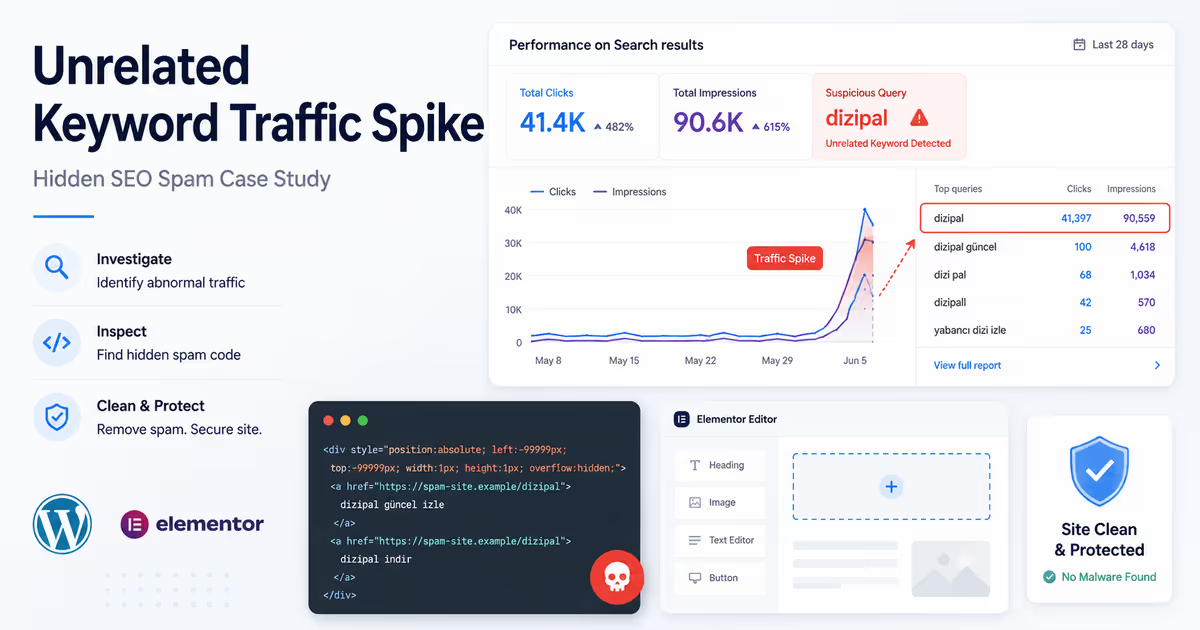
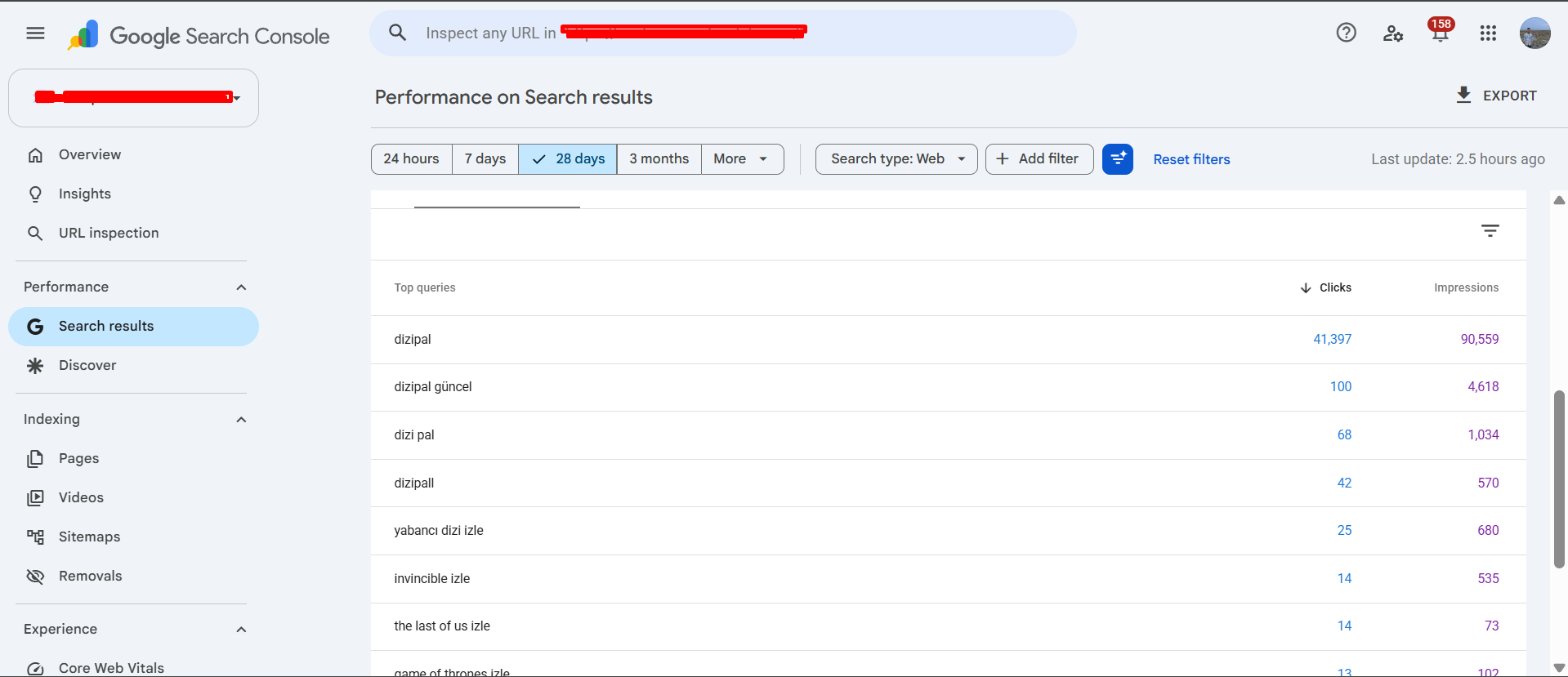
The client contacted me after Google Search Console started reporting traffic from a keyword that had nothing to do with the website. During a 28-day period, “dizipal” generated 41,397 clicks and 90,559 impressions. Search Console also showed related queries such as “dizipal güncel,” “dizi pal,” and “yabancı dizi izle.”
The website did not publish entertainment or streaming content, so it had no legitimate reason to appear for those searches.
After checking the homepage, WordPress files, database, and page-builder content, I found hidden SEO spam inside an Elementor HTML widget. CSS moved the spam outside the visible browser area, so normal visitors could not see it. Search engines could still process the text and links.
I also found additional malware during the wider website scan. This confirmed that the hidden content was part of a real compromise rather than an accidental Elementor edit.
This case shows why a traffic spike is not always growth. When a website suddenly ranks for unrelated keywords, it may be an early warning of WordPress malware or SEO spam.
The warning appeared in Google Search Console
The first clue was not a security warning, redirect, or broken page. It was the Search Console performance report.
One query had overtaken the website’s normal search data:
- Query: “dizipal”
- Clicks: 41,397
- Impressions: 90,559
- Period: 28 days
The numbers were far higher than the website normally received. At first glance, this could look like a ranking success. But the query had no connection to the company, its content, country, or customers.
That mismatch made the traffic suspicious.
When I investigate a possible compromise, I do not only look for traffic loss. I also look for traffic that should not exist. Unexpected foreign-language searches and unrelated commercial terms can indicate injected content.
Why the homepage looked normal
The homepage did not appear obviously hacked.
There was no visible spam paragraph, strange menu item, or full-page redirect. A normal visitor could open the website and assume everything was fine.
The malicious content was hidden with off-screen CSS similar to this simplified example:
<div
  style="position:absolute; left:-99999px; width:1px; height:1px; overflow:hidden;"
>
  <a href="https://spam-example.invalid/page-1">dizipal</a>
  <a href="https://spam-example.invalid/page-2">dizipal güncel</a>
  <a href="https://spam-example.invalid/page-3">yabancı dizi izle</a>
</div>
This is a sanitized example, not the exact payload or a live malicious domain.
The element remains in the page HTML, but the large negative left value pushes it outside the visible screen. The owner does not see it during normal browsing, while a crawler can still find the text and links.
Google specifically lists using CSS to position text off-screen as an example of hidden text or link abuse. (Google for Developers)
That is why checking only the visual frontend is not enough. Hidden SEO spam often becomes clear only when you inspect the page source, rendered HTML, page-builder widgets, or stored content.
The spam was inside an Elementor HTML widget
After reviewing the homepage in Elementor, I found the injected block inside an HTML widget.
This location made the infection easy to miss: the theme files could remain clean, a file-only scan could overlook the widget, and the homepage still looked normal.
I removed the malicious HTML and reviewed the rest of the layout for additional injections. I also searched for:
- variations of the unrelated keywords;
- domains used by the spam links;
- large negative CSS values;
- hidden anchor tags;
- unknown scripts and remote resources;
- suspicious HTML widgets on other pages.
Finding the visible block was only the first step. A proper investigation also had to determine whether the same code existed somewhere else or could return after cleanup.
I scanned the database for other copies
Because the malicious content was inserted through a page builder, the database was an important part of the investigation.
I searched for the unrelated keywords, suspicious domains, off-screen CSS, scripts, and duplicate copies of the injected HTML. I also reviewed other saved content where a second payload could remain.
The wider database scan did not reveal another active copy.
This step still mattered. Removing one widget without searching the database could leave behind an infected page, old revision, hidden setting, or second payload that continued feeding spam signals to Google.
I also checked for common persistence methods, including unknown administrator accounts, recently modified PHP files, suspicious plugins, scheduled tasks, and unfamiliar code loaded on every request.
A proper cleanup must answer two questions:
- Where is the spam located?
- What allowed the attacker to insert or restore it?
Deleting only the keyword block may remove the symptom without closing the original entry point.
How I cleaned and verified the site
The cleanup involved more than editing one Elementor widget.
First, I removed the hidden block and confirmed that the homepage still worked correctly. I then loaded the site while logged out, cleared its cache, and searched the source and rendered HTML for the spam keywords, links, and off-screen CSS.
Next, I scanned the database and reviewed WordPress files, plugins, users, and recently modified items. WordPress, plugins, and themes were updated where necessary. Unused components were removed, important passwords were changed, and administrative access was hardened.
Finally, I cleared the WordPress, hosting, and CDN caches. An old cached version of an infected homepage can remain publicly available after the stored content has been cleaned.
I verified the result with an incognito browser, source-code checks, and repeat scans. The unrelated keyword block and spam links were no longer present on the live homepage.
Requesting reindexing after malware removal
Cleaning WordPress does not immediately erase what Google previously crawled.
Google may still have an older infected version of the homepage in its index. That version can continue affecting search queries, snippets, and rankings until Google processes the cleaned page.
After confirming that the live homepage was clean, I used the URL Inspection tool in Google Search Console and requested indexing for the homepage. Google confirms that the tool can test the live version of a page and request that the URL be crawled again. (Google Help)
I also checked the sitemap and continued monitoring:
- impressions and clicks for the unrelated query;
- new foreign-language searches;
- indexed pages and search snippets;
- Security Issues and Manual Actions;
- legitimate keyword visibility;
- any return of the suspicious HTML.
Requesting indexing does not guarantee immediate removal. It tells Google that a cleaned version of the page is available for another crawl.
How to recognize a malicious traffic spike
A legitimate traffic increase normally supports the website’s business goals. A malware-driven increase often looks different.
Investigate the website when one unrelated query suddenly produces most of the clicks, the searches are in a language the site does not use, or traffic rises without matching leads, sales, or engagement.
Other warning signs include:
- several variations of the same unrelated term;
- an unexpected change in visitor countries;
- a homepage ranking for content it does not visibly contain;
- off-screen text or links in the source;
- a spike without new content, backlinks, or marketing work.
None of these signs alone proves that a website is hacked. Together, they are strong reasons to begin a technical investigation.
Google has also advised website owners to watch for unnatural queries because unexpected search terms can reveal hacked content, including spam in another language. (Google for Developers)
Why this case was different
Many SEO spam attacks generate thousands of fake URLs, inject remote links into theme files, or redirect visitors.
This incident was different.
The main symptom was a huge Search Console spike for one unrelated keyword. The spam was placed inside the existing homepage through an Elementor HTML widget, without obvious fake posts, visible defacement, or a public redirect.
The traffic graph looked positive, while the underlying cause was harmful.
The important clue was not the size of the traffic. It was the lack of relevance.
Final lesson
Google Search Console is not only an SEO reporting tool. It can also expose signs of a compromised website.
In this case, 41,397 clicks for an unrelated query led to a hidden Elementor SEO spam injection. The code used off-screen CSS to keep keyword-rich links invisible to visitors while leaving them in the page HTML.
The fix required removing the infected widget, checking the live source, scanning the database, reviewing the site for persistence, hardening access, clearing caches, and requesting indexing of the cleaned homepage.
If your WordPress site suddenly receives traffic from unrelated keywords, do not assume the spike is a success. Check Search Console, inspect the page source, review page-builder HTML widgets, and scan both files and database content.
Frequently asked questions
Why is Search Console showing unrelated keywords?
Google may have found text, links, pages, or rendered content added without your knowledge. Unrelated queries justify checking for SEO spam, hidden text, hacked pages, redirects, and database injections.
Can malware hide inside an Elementor HTML widget?
Yes. Someone with unauthorized WordPress access can insert HTML, links, CSS, or scripts into page-builder content. A file-only scan may not detect it.
Why was the spam invisible?
The injected CSS moved the block outside the visible browser area. The text remained in the HTML even though visitors could not see it.
Will the unrelated keyword disappear immediately?
Not necessarily. Google must crawl and process the cleaned page again. Request indexing for the affected page and continue monitoring Search Console.