Who Hacked Who? Finding Root-Level Malware on Bluehost Servers

Every website owner dreads the email. The subject line usually reads something like “Security Warning: Malicious files detected on your account.”
Recently, one of my client sites hosted on Bluehost was flagged for malware. Hacks happen. In the shared hosting world, an outdated plugin or a weak password is often all it takes. I immediately went to work, scrubbing the /home/username/public_html directory, updating passwords, and locking down the installation.
I replied to the ticket stating the account was clean and asked for a re-scan to lift the restrictions.
Three days later, after dodging initial attempts to upsell me their paid security add-on (SiteLock), support replied with a fresh scan report indicating the account was still infected.
I opened the report, ready to find a file I had missed. Instead, I found a technical impossibility that has left me trapped in a support loop for 72 hours.
The Impossible Request
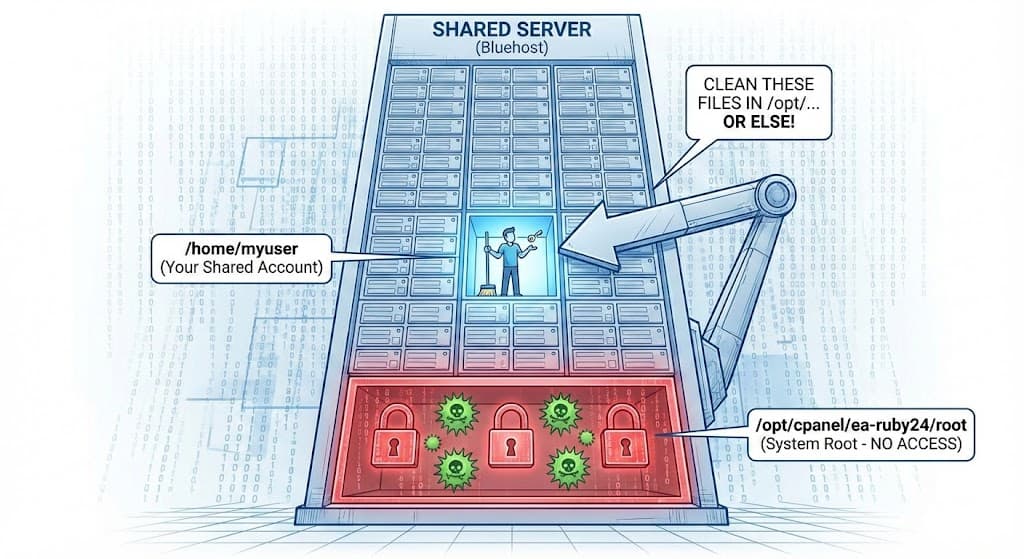
As a shared hosting customer, I am leasing a small apartment inside a massive skyscraper. I have the keys to my apartment (my /home/myuser directory). I am responsible for cleaning my apartment.
I do not have the keys to the building’s boiler room, the elevator shaft, or the main electrical junction box. Those are system-level areas owned by the landlord (Bluehost).
Yet, here is the scan report Bluehost sent me, demanding I clean up these “infected files” to restore my account standing:
/opt/cpanel/ea-ruby24/root/var/run/passenger-instreg/passenger.50hmMVI/apps.s/.ic3aafq6dcjw: SL-BIN-TROJAN-GENERIC-md5-hdb.UNOFFICIAL FOUND
/opt/cpanel/ea-ruby24/root/var/run/passenger-instreg/passenger.50hmMVI/apps.s/.mlh01hs4z1qu: SL-BIN-TROJAN-GENERIC-md5-hga.UNOFFICIAL FOUND
[...and hundreds more like it...]

If you are not technical, let me explain why this is absurd.
The directory /opt/cpanel/ is a root system directory. It is the server’s “boiler room.” As a shared hosting user with standard permissions, if I try to delete, edit, or even view those files via FTP or the File Manager, I will get a Permission Denied error. The server is explicitly configured to stop me from touching those files.
Yet, Bluehost support is insisting that I remove them.
The Support Loop
I replied to the ticket, explaining the situation clearly:
“I’m using shared hosting. You have given me a portion of the server with a specific user. I am only responsible for this account, and I have cleaned the malware from my home directory.
Now you are detecting malware in YOUR server root files and asking me to clean them? I don’t even have access to these parts of the server. How do you propose I delete files in
/opt/cpanel/without root access?”
The response? A generic, scripted reply attaching the exact same scan report and telling me to clean the files or hire a professional.
They are following a script that doesn’t account for the technical reality of the paths their own scanner is spitting out.
A Worrying Hypothesis: Is the Server the Problem?
While the immediate frustration is the support loop, these file paths raise a bigger, more concerning question about Bluehost’s server hygiene.
The paths indicate these are temporary registry files related to Phusion Passenger (used for running Ruby/Python apps on cPanel).
It is highly likely that a malicious script inside my client’s account spawned these processes, creating these dirty temporary files in the system folder. I own the initial intrusion—that’s on me.
However, why are these system-level files persisting? Why is the server allowing these malicious processes to hang in the passenger-instreg directory long after the source script in my home folder is gone?
When support sends me a report showing hundreds of active Trojans sitting in a root-level system directory—a directory I cannot touch—it forces me to ask: Was my client’s site hacked because the server environment itself is already compromised?
If the landlord’s boiler room is full of toxic waste, how long until it seeps into the apartments?
The Stalemate
As of today, I am at a stalemate. My client’s site is effectively being held hostage by a scan report listing files that Bluehost’s own security permissions prevent me from deleting.
To anyone else who receives a malware report from their host: before you panic buy their security upsell, look closely at the file paths. If they start with /home/youruser/, get to work cleaning.
But if they start with /opt/, /usr/, or /var/, prepare yourself for a long, frustrating conversation with support about the definition of “shared” hosting.

